UndertaleLanguage packs

Undertale Italian patch with USP installer
Italian translation installer documented for UNDERTALE v1.08. It patches your own legitimate game installation.
Installation
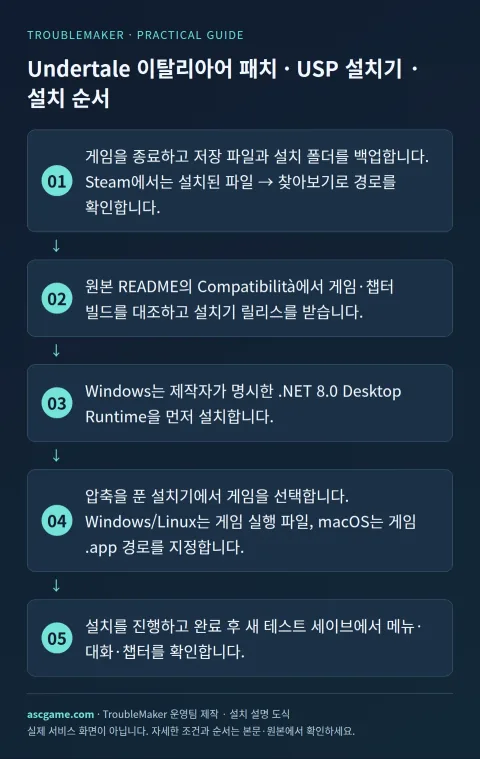
- Close the game and back up saves and the installation folder. Find the location through Steam Installed Files, Browse.
- Match game and chapter builds under Compatibilità in the README, then get the installer release.
- On Windows install the documented .NET 8.0 Desktop Runtime first.
- Extract the installer and select the game. Choose its executable on Windows/Linux or its .app path on macOS.
- Apply the patch and check menus, dialogue and chapters using a new test save.
Removal · recovery
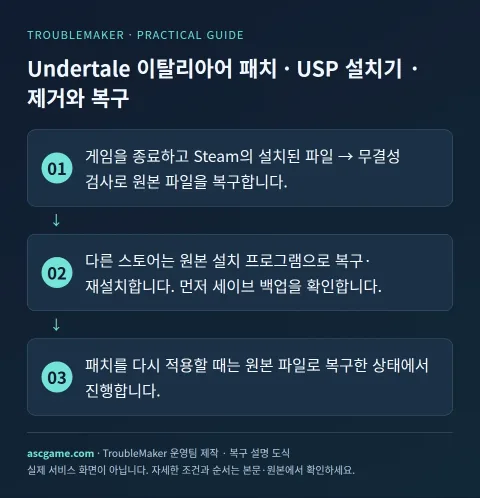
- Close the game and restore original files with Steam Installed Files, Verify integrity.
- For other stores repair or reinstall from the original installer after checking your save backup.
- Restore original files before applying the patch again.