MinecraftLanguage packs

Minecraft Java Khmer language pack
Adds Khmer for Cambodian players as a resource pack, selectable through the language menu without a mod loader.
Installation
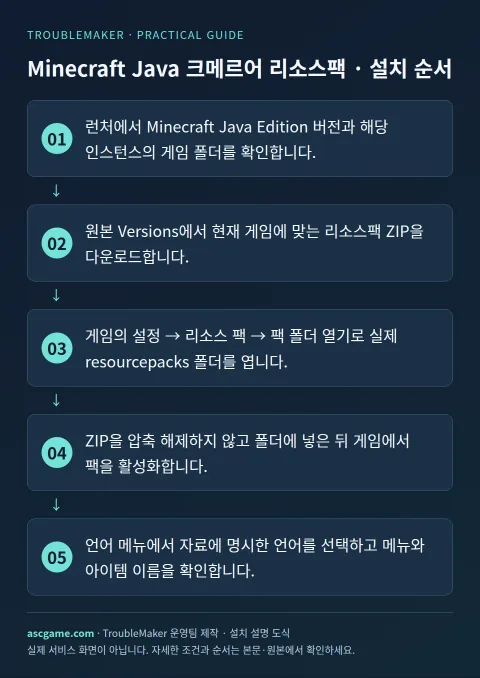
- Check your Minecraft Java Edition version and launcher instance folder.
- Download a resource-pack ZIP matching your game under Versions.
- Use Options, Resource Packs, Open Pack Folder to locate the actual resourcepacks folder.
- Put the ZIP there without extracting it and enable the pack in the game.
- Select the documented language and check menus and item names.
Removal · recovery
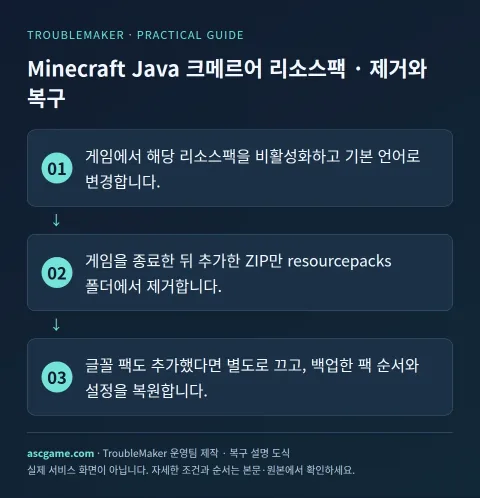
- Disable the resource pack and choose a built-in language.
- Close the game and remove only the added ZIP from resourcepacks.
- Disable any added font pack separately and restore your backed-up pack order and settings.