Diablo II: Lord of DestructionModding tools
Diablo II classic LoD PlugY shared and expanded stash
Offline shared and expanded storage and convenience features for original Lord of Destruction. Not a Resurrected mod. Configure features and save paths in PlugY.ini.
Installation
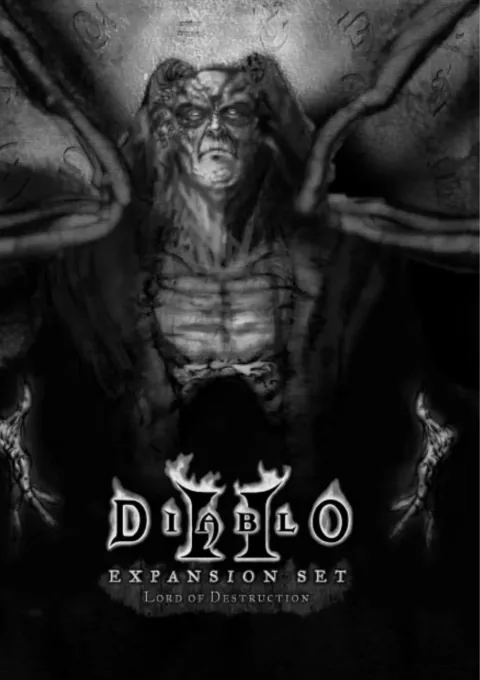
- Confirm original Diablo II and Lord of Destruction and check the game version. Keep this out of the Resurrected folder.
- Close the game and back up every file in the actual save path, including shared-stash
.sssfiles and an existingPlugY.ini. - Get the
Installer.exepackage from the originalv14.03release. Follow its Readme and select your classic LoD folder. Keep the D2FilePatcher method separate. - Back up
PlugY.inibefore configuring features and a dedicated save path. Do not share saves with a different overhaul. - Launch
PlugY.exe. Test personal and shared storage and saving with a new offline character; compare copies of existing saves first. - Read
CONFIGURATIONin the original Readme for individual features. Keep the installation-time manual backup even when automatic backups are enabled.
Removal · recovery
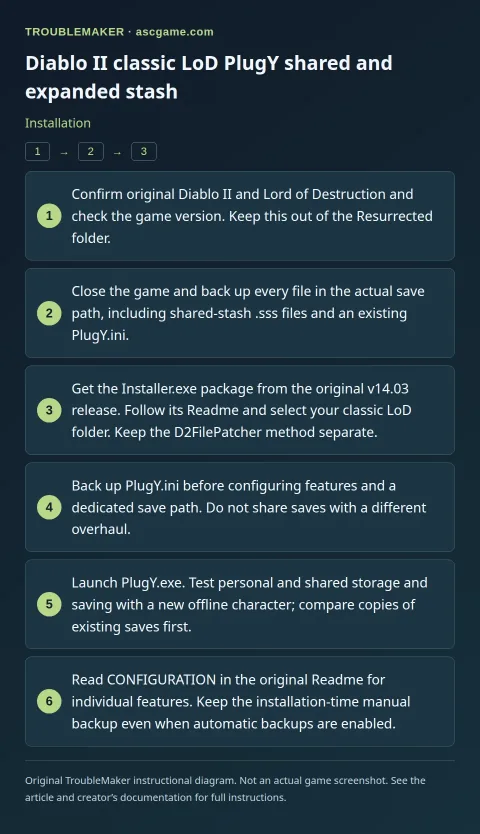
- While PlugY is enabled, move items beyond normal stash capacity into compatible normal storage. Restore pre-install saves if consolidation is impossible.
- Close the game and preserve the entire current save folder and shared-stash
.sssfiles. Use the author’s uninstaller and stop using the PlugY shortcut. - Compare existing saves in the original base game. Archive mod shared storage instead of deleting it. Do not perform DLL-patch recovery steps for a method this guide did not use.