Diablo II: ResurrectedSkins · mods

Diablo II: Resurrected Custom Item Colors UI skin
Customize ground-item name colors by type. Inventory and stash tooltip colors and drop rates are unchanged.
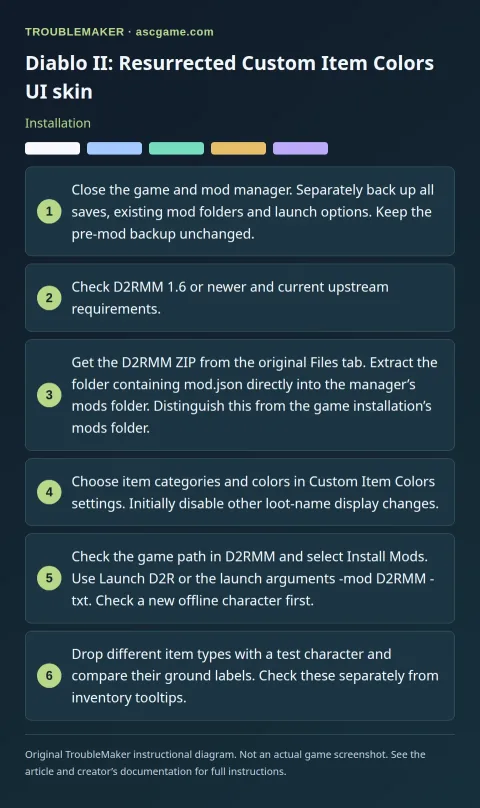
Installation
- Close the game and mod manager. Separately back up all saves, existing mod folders and launch options. Keep the pre-mod backup unchanged.
- Check D2RMM 1.6 or newer and current upstream requirements.
- Get the D2RMM ZIP from the original Files tab. Extract the folder containing
mod.jsondirectly into the manager’smodsfolder. Distinguish this from the game installation’smodsfolder. - Choose item categories and colors in
Custom Item Colorssettings. Initially disable other loot-name display changes. - Check the game path in D2RMM and select
Install Mods. UseLaunch D2Ror the launch arguments-mod D2RMM -txt. Check a new offline character first. - Drop different item types with a test character and compare their ground labels. Check these separately from inventory tooltips.
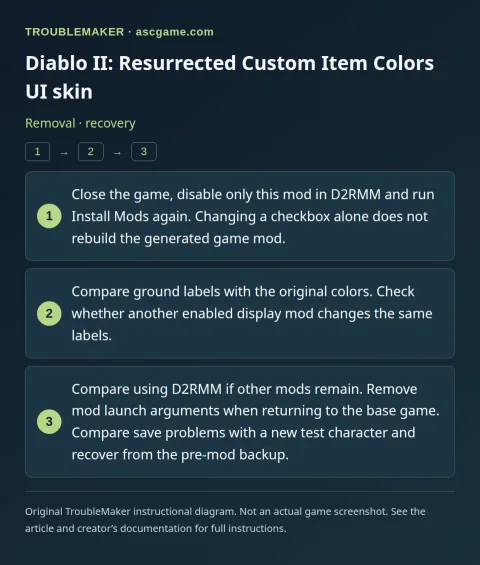
Removal · recovery
- Close the game, disable only this mod in D2RMM and run
Install Modsagain. Changing a checkbox alone does not rebuild the generated game mod. - Compare ground labels with the original colors. Check whether another enabled display mod changes the same labels.
- Compare using D2RMM if other mods remain. Remove mod launch arguments when returning to the base game. Compare save problems with a new test character and recover from the pre-mod backup.