Diablo II: ResurrectedSkins · mods

Diablo II: Resurrected Alternative Classes character skins
Provides two alternative looks per class described at release. Apply the D2RMM loader with your chosen texture files.
Installation
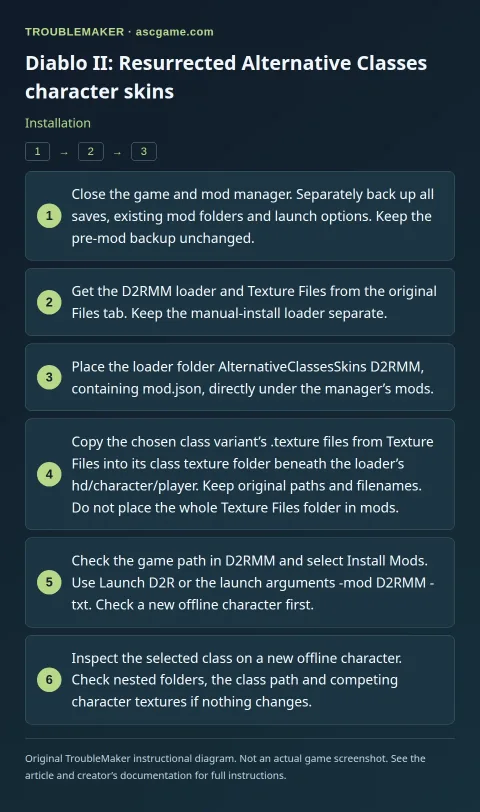
- Close the game and mod manager. Separately back up all saves, existing mod folders and launch options. Keep the pre-mod backup unchanged.
- Get the D2RMM loader and
Texture Filesfrom the original Files tab. Keep the manual-install loader separate. - Place the loader folder
AlternativeClassesSkins D2RMM, containingmod.json, directly under the manager’smods. - Copy the chosen class variant’s
.texturefiles fromTexture Filesinto its class texture folder beneath the loader’shd/character/player. Keep original paths and filenames. Do not place the wholeTexture Filesfolder inmods. - Check the game path in D2RMM and select
Install Mods. UseLaunch D2Ror the launch arguments-mod D2RMM -txt. Check a new offline character first. - Inspect the selected class on a new offline character. Check nested folders, the class path and competing character textures if nothing changes.
Removal · recovery
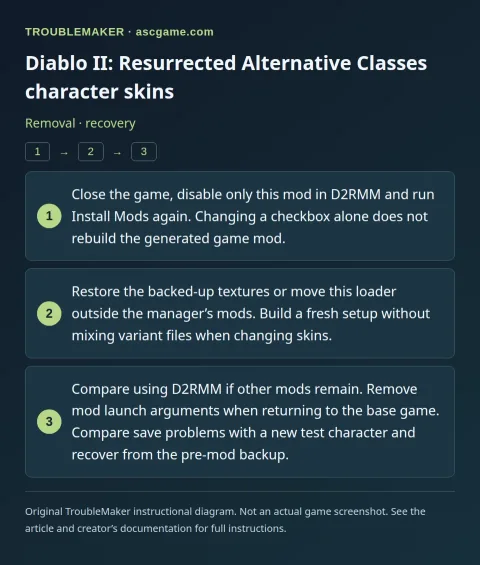
- Close the game, disable only this mod in D2RMM and run
Install Modsagain. Changing a checkbox alone does not rebuild the generated game mod. - Restore the backed-up textures or move this loader outside the manager’s
mods. Build a fresh setup without mixing variant files when changing skins. - Compare using D2RMM if other mods remain. Remove mod launch arguments when returning to the base game. Compare save problems with a new test character and recover from the pre-mod backup.