
How to Make Stardew Valley Mods: Create Your First Dialogue Pack with Content Patcher
In Stardew Valley PC 1.6 series, create a small pack that changes Abigail's first meeting dialogue using SMAPI and Content Patcher. Learn the data-changing principle with two JSON files without C# DLLs. Instead of directly overwriting game XNB files, compare application and removal in a new test save.
1. Prepare SMAPI and Content Patcher
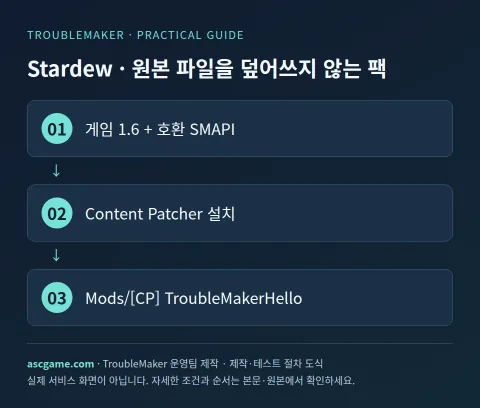
Make sure the vanilla game runs properly and back up your saves and Mods folder. Install the SMAPI version matching your current game from the creator's site, then get Content Patcher from the original source. Check the supported versions and requirements for each file. Run the game once with SMAPI to verify that the loader and Content Patcher display normally, then exit. Temporarily turning off other dialogue modification packs during the first test makes it easier to isolate the cause.
2. Create the Pack Folder
Create a [CP] TroubleMakerHello folder directly under the game's Mods directory. Check the location of manifest.json so that folders with the same name do not nest twice when extracted. On Windows, make sure file name extensions are visible so it is not saved as .json.txt.
Stardew Valley/
  Mods/
    ContentPatcher/
    [CP] TroubleMakerHello/
      manifest.json
      content.json
3. Write manifest.json
Specify UniqueID in the format Creator.PackName to avoid conflicts with other packs. The UniqueID in ContentPackFor is not your pack ID, but Content Patcher's ID. The content below is the full manifest for this example. Save as UTF-8 in a text editor.
{
  "Name": "TroubleMaker Hello Dialogue",
  "Author": "TroubleMaker",
  "Version": "1.0.0",
  "Description": "An original introduction dialogue example.",
  "UniqueID": "TroubleMaker.HelloDialogue",
  "MinimumApiVersion": "4.0.0",
  "ContentPackFor": {
    "UniqueID": "Pathoschild.ContentPatcher"
  }
}
4. Change a Dialogue with content.json
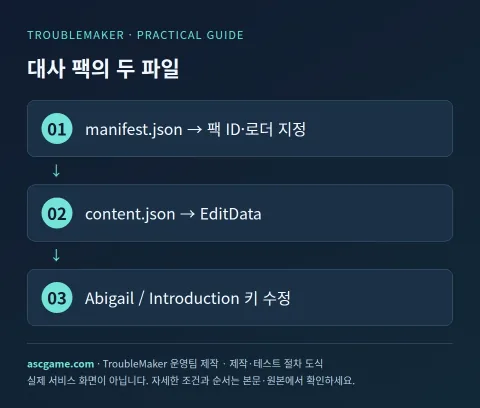
EditData modifies designated keys of existing data. Insert your own dialogue into the Introduction key of Characters/Dialogue/Abigail. Pack Format 2.0.0 is the format for Content Patcher pack examples for game 1.6 series, and actual required versions of SMAPI and Content Patcher should be checked in the installed tool guide. This example changes only the first introduction dialogue, not general daily dialogues.
{
  "Format": "2.0.0",
  "Changes": [
    {
      "Action": "EditData",
      "Target": "Characters/Dialogue/Abigail",
      "Entries": {
        "Introduction": "Hello! You must be the new farmer. Let's see each other often around town!"
      }
    }
  ]
}
5. Verify Application in a New Save
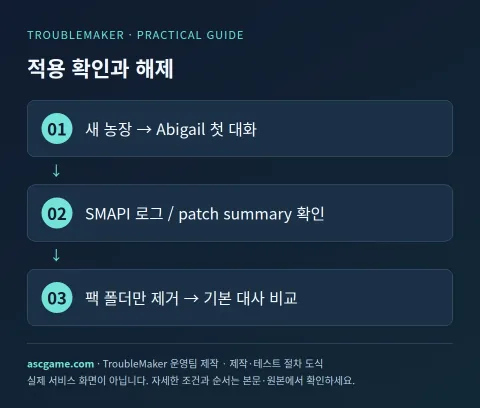
- Run with SMAPI and check the console to see if TroubleMaker Hello Dialogue was loaded.
- Create a new test farm and talk to Abigail for the first time before having met her yet.
- If your written introduction dialogue appears, the key and path were applied correctly. If you already had the introduction dialogue in an existing save, the same sentence might not appear again.
- If the dialogue does not change, check the pack and patch status with patch summary in the SMAPI console.
- Exit the game, modify content.json, and re-run to compare. For how to use patch reload in the console during development, check the installed Content Patcher documentation.
- Move the creation pack out of Mods and run again in a separate test farm to confirm it reverts to the default introduction dialogue.
6. Troubleshooting JSON Errors and Conflicts
Missing commas, quote errors, and key name typos are common. JSON does not use trailing commas after the last item. Make sure smart quotes were not substituted when saving with a default editor. If another pack changes the same Abigail Introduction key, results may vary depending on the actual loading order. Succeed with only one pack turned on, then add existing configurations one by one and compare logs. When data loaded depends on the game language, check language-specific conditions and i18n features in the original documentation.
7. Removal, Version Control, and Distribution
This pack only modifies dialogue data. You can uninstall it by exiting the game and removing the pack folder, which carries different risks than removing map or item expansion mods. Place the pack folder at the top level of the distribution ZIP and make both JSONs directly visible inside it. In the README, write that PC 1.6, SMAPI, and Content Patcher are required, explain that only the first introduction dialogue changes, and state the test conditions. Verify that dialogues and images are your own work and do not include text or portraits from other creators without permission.
Original Documentation and Verification Criteria
An introductory guide written by the TroubleMaker operations team, verified against creator and official tool documentation on October 7, 2026. Code and diagrams are custom examples for explanation purposes and do not represent actual gameplay verification of the game on this server. Verify and distribute in a separate test save with the versions specified in the text. Cross-reference the latest versions and dependencies for each tool from the sources below.
Gemini machine translation · Original text and source region are preserved.
Original language · ko
스타듀밸리 모드 만드는 법: Content Patcher로 첫 대사 팩 만들기
Stardew Valley PC 1.6 계열에서 SMAPI와 Content Patcher를 사용해 Abigail의 첫 만남 대사를 바꾸는 작은 팩을 만듭니다. C# DLL 없이 JSON 두 파일로 데이터 변경 원리를 배울 수 있습니다. 게임 XNB 파일을 직접 덮어쓰지 않고, 새 테스트 세이브에서 적용·해제를 비교합니다.
[1. SMAPI와 Content Patcher 준비]
정품 게임이 기본 상태로 실행되는지 확인하고 세이브와 Mods 폴더를 백업합니다. 현재 게임에 맞는 SMAPI를 제작자 사이트에서 설치한 뒤 Content Patcher를 원본 제공처에서 받습니다. 각 파일의 지원 버전과 Requirements를 확인하세요. SMAPI로 게임을 한 번 실행해 로더와 Content Patcher가 정상 표시되는지 확인한 뒤 종료합니다. 다른 대사 수정 팩은 첫 테스트에서 잠시 꺼두면 원인 구분이 쉽습니다.
[image:conditions]
[2. 팩 폴더를 만들기]
게임의 Mods 바로 아래에 [CP] TroubleMakerHello 폴더를 만듭니다. 압축을 풀었을 때 같은 이름의 폴더가 두 번 겹치지 않도록 manifest.json의 위치를 확인합니다. Windows는 확장자 표시를 켜고 .json.txt로 저장되지 않도록 주의하세요.
```text
Stardew Valley/
Mods/
ContentPatcher/
[CP] TroubleMakerHello/
manifest.json
content.json
```
[3. manifest.json 작성하기]
UniqueID는 다른 팩과 충돌하지 않는 제작자.팩이름 형태로 지정합니다. ContentPackFor의 UniqueID는 내가 만든 팩 ID가 아니라 Content Patcher의 ID입니다. 아래 내용은 이번 예제의 전체 manifest입니다. 텍스트 편집기에서 UTF-8로 저장합니다.
```json
{
"Name": "TroubleMaker Hello Dialogue",
"Author": "TroubleMaker",
"Version": "1.0.0",
"Description": "An original introduction dialogue example.",
"UniqueID": "TroubleMaker.HelloDialogue",
"MinimumApiVersion": "4.0.0",
"ContentPackFor": {
"UniqueID": "Pathoschild.ContentPatcher"
}
}
```
[4. content.json으로 대사 하나 변경하기]
EditData는 기존 데이터의 지정 키를 수정합니다. Characters/Dialogue/Abigail의 Introduction 키에 자체 대사를 넣습니다. 팩 Format 2.0.0은 게임 1.6 계열용 Content Patcher 팩 예제의 형식이며 SMAPI와 Content Patcher 실제 요구 버전은 설치한 도구 안내에서 확인합니다. 이 예제는 일반 매일 대사가 아니라 첫 소개 대사만 바꿉니다.
```json
{
"Format": "2.0.0",
"Changes": [
{
"Action": "EditData",
"Target": "Characters/Dialogue/Abigail",
"Entries": {
"Introduction": "안녕! 네가 새로 온 농장 주인이구나. 마을에서 자주 만나자!"
}
}
]
}
```
[image:request]
[5. 적용 확인은 새 세이브에서]
1. SMAPI로 실행하고 콘솔에 TroubleMaker Hello Dialogue가 읽혔는지 확인합니다.
2. 새 테스트 농장을 만들고 Abigail을 아직 만나지 않은 상태에서 처음 대화합니다.
3. 작성한 소개 대사가 나오면 키와 경로가 정상 적용된 것입니다. 기존 세이브에서 이미 소개 대화를 했다면 같은 문장이 다시 나오지 않을 수 있습니다.
4. 대사가 안 바뀌면 SMAPI 콘솔에서 patch summary로 팩과 패치 상태를 확인합니다.
5. 게임을 종료한 뒤 content.json을 수정하고 재실행해 비교합니다. 개발 중 콘솔의 patch reload 사용법은 설치한 Content Patcher 문서를 확인합니다.
6. 제작 팩을 Mods 밖으로 옮긴 뒤 다시 실행해 기본 소개 대사로 돌아오는지 별도 테스트 농장에서 확인합니다.
[6. JSON 오류와 충돌 해결]
쉼표 누락, 따옴표 오류, 키 이름 오타가 흔합니다. JSON은 마지막 항목 뒤에 불필요한 쉼표를 쓰지 않습니다. 기본 편집기로 저장할 때 스마트 따옴표로 바뀌지 않았는지 확인하세요. 같은 Abigail Introduction 키를 바꾸는 다른 팩이 있으면 실제 로딩 순서에 따라 결과가 달라질 수 있습니다. 팩 하나만 켠 상태에서 성공한 뒤 기존 구성을 하나씩 추가하고 로그를 비교합니다. 게임 언어에 따라 불러오는 데이터가 달라질 때는 언어별 조건과 i18n 기능을 원본 문서에서 이어서 확인합니다.
[image:contact]
[7. 제거·버전 관리·배포]
이 팩은 대사 데이터만 수정합니다. 게임을 종료하고 해당 팩 폴더를 제거해 해제할 수 있으며 지도·아이템 확장 모드의 제거와는 위험이 다릅니다. 배포 ZIP 최상위에 팩 폴더를 두고 그 안에 두 JSON이 바로 보이게 만듭니다. README에 PC 1.6, SMAPI·Content Patcher 필요, 첫 소개 대사만 바뀐다는 설명과 테스트 조건을 적으세요. 대사와 이미지가 본인 작성물인지 확인하고 다른 제작자의 텍스트·초상화를 허락 없이 포함하지 않습니다.
[원본 문서와 확인 기준]
2026년 10월 7일 제작자·공식 도구 문서를 확인해 TroubleMaker 운영팀이 작성한 입문 공략입니다. 코드와 도식은 설명을 위한 자체 예제이며 이 서버에서 해당 게임의 실제 플레이를 검증한 결과는 아닙니다. 본문에 명시한 버전으로 별도 테스트 세이브에서 확인하고 배포하세요. 도구별 최신 버전·의존성은 아래 원본에서 대조합니다.
https://github.com/Pathoschild/StardewMods/blob/develop/ContentPatcher/docs/author-guide.md
https://wiki.stardewvalley.net/Modding:Content_packs
https://wiki.stardewvalley.net/Modding:Content_Patcher
https://smapi.io/
comments 0