
Riot refund method: LoL RP/purchase cancellation and refund and Valorant VP/skin inquiry
This is information for those who want to receive a refund for games or items paid for at Riot Games / LoL / VALORANT. First, check the actual seller of the receipt and follow the steps to submit it to the account you purchased it from. We've even outlined how to inquire when you don't see the refund button and how to check the results.
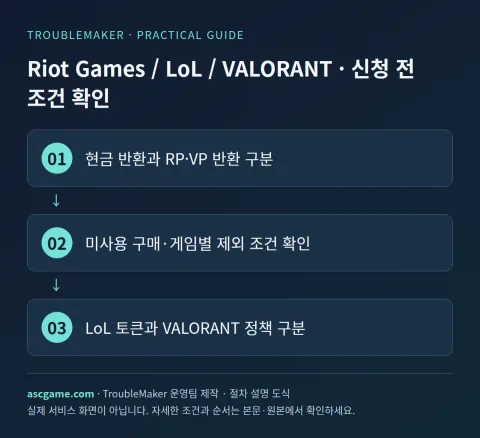
1. Check if my purchase is eligible for a refund
Riot's global policy states that you can request a cash refund from support within 14 days of purchase if you haven't spent any of the game currency you purchased with cash or used any refundable content. Account country policies and game-specific conditions apply together. Cancellation and refund of content purchases that are returned in game currency are different from requests to receive money back to the original payment method.
2. Changes by game, DLC, and subscription
LoL·PC TFT has separate rules for using refund tokens. The global document explains refundable purchases within the last 90 days, a maximum of 3 tokens, and 1 replenishment per year when there are less than 3 remaining. Eligible content unused within 14 days may be processed without a token. VALORANT checks unused VP and unused refundable content, and compares exclusion conditions such as use, upgrade, and bundle on individual pages. PC token rules do not apply to purchases of mobile TFTs.
3. Materials to prepare before application
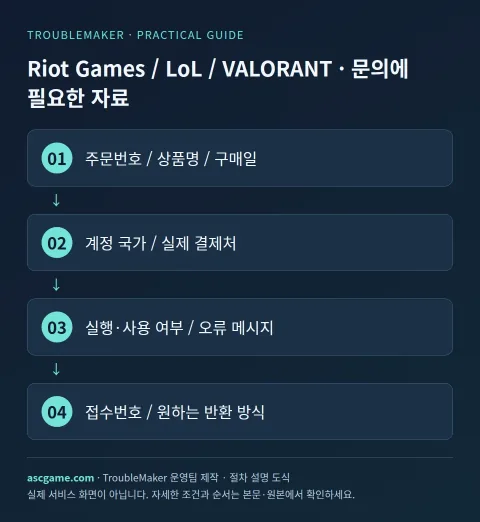
Order number, payment date and time, product name/edition, amount/currency, actual payment destination, account country, execution/use status are organized in one note. If there is an error, write down the error code, when it occurred, and what action you have already tried. Attach only the part of the receipt screen that shows your account email and order to official private inquiries and do not post it in public comments.
4. Proceed with refund application step by step
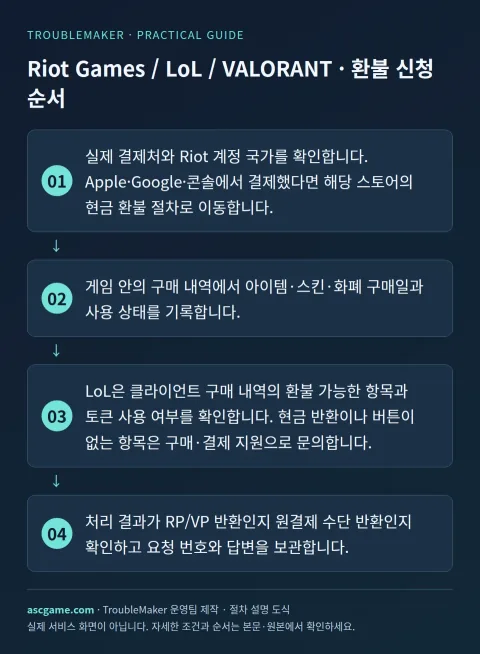
- Confirm your actual payment source and Riot account country. If you paid through Apple, Google, or Console, go to the store's cash refund procedure.
- Record the purchase date and usage status of items, skins, and currency in the in-game purchase history.
- Select League of Legends or VALORANT from the Riot Support Hub.
- LoL checks client purchase history for refundable items and token usage. For cash returns or items that do not have a button, please contact purchase/payment support.
- VALORANT checks eligible items through the login/purchase history inquiry path in the official refund information. If a refund request path is provided in the support documentation, use that guidance.
- Check whether the processing result is a return of RP/VP or a return of the original payment method, and save the request number and response.
5. When it is not on the list or the money is not visible after approval
Do not use the skin with the skin installed or write the upgraded status as unused. The policy can even determine which mode you used it in, so read the game-specific usage definitions first. Refunding a product purchased with RP does not deposit cash into your bank account. Event passes, bundles, gifts, and consumable items have different refundability than regular content. Card payment disputes may be linked to account restrictions, so check official support results and instructions first.
6. Contact customer support
In the Support Hub, select Game → Payment/Purchase Issues and log in to submit an inquiry. Fill out your Riot ID, account country, payment receipt, item purchase date, whether you used or upgraded it, and even your preferred return method. If you write in the first sentence whether you want your RP refunded or your money returned, the direction of consultation will be clear. If you receive a response for the same incident, use the case number to ask additional questions.
7. Inquiry that can be rewritten as is
The sentence below is an example of an inquiry message sent to customer support and is not a method of bypassing approval. Replace the parentheses with actual information and erase anything that does not apply to your situation. In particular, whether it is used or when it is first run is stated truthfully.
Title: [Riot Games / LoL / VALORANT] Purchase Refund / Payment Inquiry
Order number: [Order number on receipt]
Product Name/Edition: [Game / DLC / Subscription Name]
Purchase date/amount/currency: [Date and actual amount]
Purchase place/account country: [store and country]
Run/Use: [Play time / Not used]
Problem: [When it occurred and the actual reason]
Actions already attempted: [Actions and Results]
Request: [Refund availability / Confirm order / Check processing status]
Existing application number: [Enter if available]
8. Check after submission
Save the application completion screen and confirmation email and check the status of your request first. Reviewing, approval, rejection, and waiting for payment company reflection are different states. If denied, check what conditions were applied and supplement the original request as new evidence becomes available. Even if a refund is approved, check separately whether automatic renewal has been canceled. The process is completed by confirming the final return method and changes in game/item usage rights.
Source and verification criteria
Written by the TroubleMaker operations team based on the original instructions confirmed on October 7, 2026. The images below are schematics I created to explain the procedure and are not actual account screens or proof of application completion. Menu names and terms of provision may vary depending on account country, product, or update, so please check the original page as well.
Riot Global Refund/Token Policy
Google Translate machine translation · Original text and source region are preserved.
Original language · ko
라이엇 환불 방법: 롤 RP·청약철회와 발로란트 VP·스킨 문의
Riot Games / LoL / VALORANT에서 결제한 게임이나 아이템을 돌려받고 싶은 분을 위한 안내입니다. 먼저 영수증의 실제 판매처를 확인하고, 구매한 계정으로 접수하는 순서를 따라가세요. 환불 버튼이 안 보일 때 문의하는 방법과 결과를 확인하는 방법까지 정리했습니다.
[1. 내 구매가 환불 대상인지 확인]
Riot 글로벌 정책은 현금으로 구매한 게임 화폐를 전혀 소비하지 않았거나 환불 가능한 콘텐츠를 사용하지 않은 경우 구매 후 14일 이내 지원팀에 현금 환불을 요청할 수 있다고 안내합니다. 계정 국가의 정책과 게임별 조건이 함께 적용됩니다. 게임 화폐로 되돌려받는 콘텐츠 청약철회와 원래 결제 수단으로 돈을 받는 요청은 다릅니다.
[image:conditions]
[2. 게임·DLC·구독별로 달라지는 점]
LoL·PC TFT에는 환불 토큰을 사용하는 별도 규칙이 있습니다. 글로벌 문서는 최근 90일 이내 환불 가능 구매, 최대 3개 토큰, 잔여가 3개 미만일 때 매년 1개 보충 등을 설명합니다. 14일 이내 미사용 적격 콘텐츠는 토큰 없이 처리될 수 있습니다. VALORANT는 미사용 VP와 미사용 환불 가능 콘텐츠를 확인하며 사용·업그레이드·묶음 등의 제외 조건을 개별 페이지에서 대조합니다. 모바일 TFT의 구매에는 PC 토큰 규칙이 그대로 적용되지 않습니다.
[3. 신청 전에 준비할 자료]
주문번호, 결제일과 시각, 상품명·에디션, 금액·통화, 실제 결제처, 계정 국가, 실행·사용 여부를 한 메모에 정리합니다. 오류가 있다면 오류 코드와 발생 시점, 이미 시도한 조치를 적습니다. 영수증 화면은 계정 이메일과 주문을 확인할 수 있는 부분만 공식 비공개 문의에 첨부하고 공개 댓글에는 올리지 마세요.
[4. 환불 신청을 단계별로 진행하기]
1. 실제 결제처와 Riot 계정 국가를 확인합니다. Apple·Google·콘솔에서 결제했다면 해당 스토어의 현금 환불 절차로 이동합니다.
2. 게임 안의 구매 내역에서 아이템·스킨·화폐 구매일과 사용 상태를 기록합니다.
3. Riot 지원 허브에서 League of Legends 또는 VALORANT를 정확히 선택합니다.
4. LoL은 클라이언트 구매 내역의 환불 가능한 항목과 토큰 사용 여부를 확인합니다. 현금 반환이나 버튼이 없는 항목은 구매·결제 지원으로 문의합니다.
5. VALORANT는 공식 환불 안내의 로그인·구매 내역 조회 경로에서 적격 항목을 확인합니다. 지원 문서의 환불 요청 경로가 제공되면 그 안내를 사용합니다.
6. 처리 결과가 RP/VP 반환인지 원결제 수단 반환인지 확인하고 요청 번호와 답변을 보관합니다.
[image:request]
[5. 목록에 없거나 승인 뒤 돈이 안 보일 때]
스킨을 장착해 사용하거나 업그레이드한 상태를 미사용이라고 적지 마세요. 어떤 모드에서 사용했는지까지 정책이 판단할 수 있으므로 게임별 사용 정의를 먼저 읽습니다. RP로 구매한 상품을 환불했다고 은행 계좌에 현금이 입금되는 것은 아닙니다. 이벤트 패스·묶음·선물·소모성 항목은 일반 콘텐츠와 환불 가능 여부가 다릅니다. 카드 결제 분쟁은 계정 제한과 연결될 수 있으므로 공식 지원 결과와 안내를 먼저 확인합니다.
[6. 고객지원으로 문의하기]
지원 허브에서 게임 → 결제/구매 문제를 선택해 로그인한 문의를 접수합니다. Riot ID, 계정 국가, 결제 영수증, 아이템 구매일, 사용·업그레이드 여부, 원하는 반환 방식까지 작성하세요. RP를 돌려받고 싶은지 돈을 반환받고 싶은지 첫 문장에 적으면 상담 방향이 명확해집니다. 같은 사건의 답변을 받았다면 접수 번호를 사용해 추가 질문합니다.
[image:contact]
[7. 그대로 고쳐 쓸 수 있는 문의문]
아래 문장은 접수 문안 예시이며 승인 우회 방법이 아닙니다. 괄호를 실제 정보로 바꾸고 본인 상황에 없는 내용을 지우세요. 특히 사용 여부나 첫 실행 시각은 사실대로 적습니다.
```text
제목: [Riot Games / LoL / VALORANT] 구매 환불 / 결제 문의
주문번호: [영수증의 주문번호]
상품명·에디션: [게임 / DLC / 구독 이름]
구매일·금액·통화: [날짜와 실제 금액]
구매처·계정 국가: [스토어와 국가]
실행·사용 여부: [플레이 시간 / 미사용 여부]
문제: [발생 시점과 실제 사유]
이미 시도한 조치: [조치와 결과]
요청: [환불 가능 여부 / 주문 확인 / 처리 상태 확인]
기존 접수번호: [있으면 기재]
```
[8. 접수 후 확인할 것]
신청 완료 화면과 확인 메일을 보관한 뒤 요청 상태를 먼저 확인합니다. 심사 중, 승인, 거절, 결제사 반영 대기는 서로 다른 상태입니다. 거절됐다면 어떤 조건이 적용됐는지 확인하고 새로운 증거가 있을 때 기존 요청에 보충합니다. 환불 승인이 나더라도 자동 갱신 해지가 함께 됐는지 따로 확인하세요. 최종 반환 방식과 게임·아이템 사용 권한의 변화를 확인하면 절차가 마무리됩니다.
[출처와 확인 기준]
2026년 10월 7일에 확인한 원본 안내를 바탕으로 TroubleMaker 운영팀이 작성했습니다. 아래 이미지들은 순서를 설명하기 위해 직접 만든 도식이며 실제 계정 화면이나 신청 완료 증빙은 아닙니다. 메뉴 명칭과 제공 조건은 계정 국가·제품·업데이트에 따라 달라질 수 있으므로 원본 페이지도 함께 확인하세요.
Riot 글로벌 환불·토큰 정책
VALORANT 공식 환불 안내
Riot 게임별 공식 지원
comments 1
모바일 TFT 구매에 PC 토큰 규칙이 적용되지 않는다고 하셨는데, 그렇다면 모바일 플랫폼에서 직접 결제한 아이템의 환불은 애플이나 구글 같은 각 앱스토어의 자체 환불 절차만을 통해서만 접수해야 하는지 궁금합니다.