
Recommended Gaming News YouTubers: G-Sik Bivalent, Kim Sil-jang, GameMeca, and Inven by Purpose
Have you ever subscribed to get gaming news only to find controversy videos or a lack of actual gameplay information needed before a purchase? Here are four channels introduced by category for domestic game issue commentary, reporting, and checking new releases. The evaluations below are editorial recommendations based on channel descriptions and the nature of public content. Since news delivery, commentary, and reviews have different purposes, it is better to check two or three together rather than trying to solve all information needs with a single channel.
1. First, Determine Your Viewing Purpose
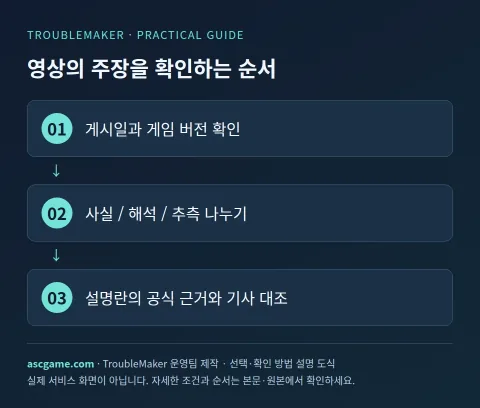
If you are curious about the background of industry debates, look for issue commentary; if you want to know about monetization and operational structures, look for analysis; to quickly check new announcements, look for media reporting and trailers; and to judge quality after release, look for actual gameplay and reviews. Even if news is in the title, it may be an opinion-centric video. Read the publication date, revision details, and covered game version first to determine if it fits the problem you are asking about now.
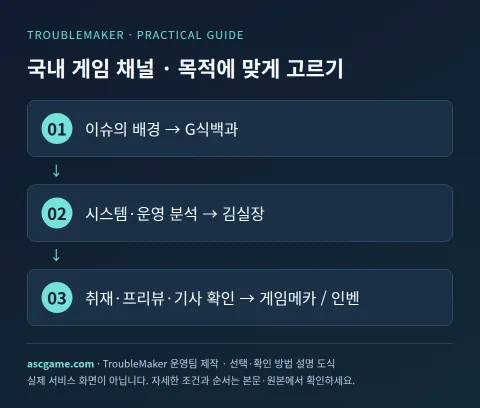
2. Kim Sung-hoe's G-Sik Bivalent · Background and Issues in Gaming
Recommended for readers who want to understand game culture, industry, and policy issues in a storytelling format. Just as the channel description says it contains miscellaneous game knowledge, it is fitting when you care more about the context and arguments of events than a simple list of release dates. When statements by parties or documents appear in the video, check the indicated sources and timestamps together. In particular, separating and noting the host's evaluation and facts confirmed by documents can help reduce emotional reactions to controversy videos.
Recommended usage: Watch recent videos of issues of interest first, then go back to older background videos to connect the flow. If you only want to know the combat controls, early builds, or PC specs of a specific game, check gameplay guides for that purpose separately. Understand legal and policy issues through video explanations, but check official announcements and implementation dates for actual changes.
3. Middle-aged Gamer Kim Sil-jang · Understanding Game Systems and Operations
Channel descriptions confirm that it analyzes the pros and cons of games based on gaming industry experience. This is the right choice for readers who wonder why a certain game chose specific operational, monetary, and growth structures. Comparing the numerical and movement explanations in reviews or demos with your own play style will help in making purchase and return decisions. However, do not apply analyses derived from one play environment to all platforms and all patches.
Recommended usage: Search within the channel using review, analysis, and demo keywords along with the game title. Revisit scenes where you want to check play grounds using timestamps, and check video descriptions for free trials, paid purchases, and sponsored tags. Make sure it is the original channel @memolkim and not another channel with the same name or unauthorized re-uploads.
4. GameMeca · Reporting and New Release Materials with Articles
This is the official channel directly linked by the GameMeca website. The channel description specifies on-site reporting, reviews, previews, hardware reviews, and trailer translations. Useful for readers who want to watch exhibition demos or new release videos and then compare detailed conditions with the original articles. Supplement missing release regions, platforms, and test conditions from official articles and game company announcements that were missed in the video alone.
Recommended usage: Look up previews and post-release reviews of the game you want to watch separately. Since trailers may be promotional edits, view them alongside materials with actual gameplay explanations, and do not assume the performance of an old demo build represents the performance of the released version. Official channel IDs can be cross-referenced with YouTube links on the homepage.
5. Inven · Multi-Platform and On-Site Gaming News Together
Inven's website introduces itself as covering PC, mobile, console, news, guides, community, and esports, and its official YouTube links to @InvenMovie. Recommended for readers who want to check cross-platform new game news, on-site videos, and related articles together. Using a specific game's dedicated guide board and Inven's video channel together makes it easy to connect announcement details to gameplay information.
Recommended usage: Re-search for games and events introduced in videos through article searches to check actual application dates and target servers. Cross-reference esports news with official tournament schedules and rosters. Event videos and interviews differ in nature from Inven's own reviews, so identify the type of information first.
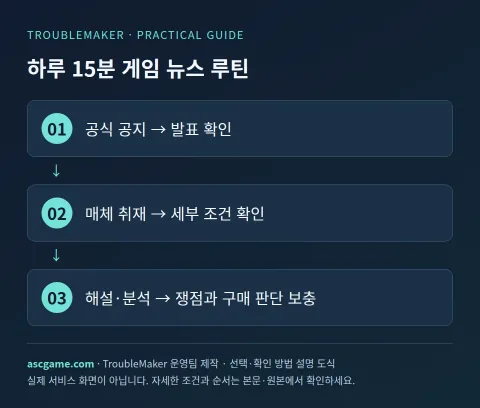
6. 15-Minute Daily Check Routine
- Check update and release dates from the official notice of the game of interest.
- Read articles and on-site videos of the announcement on GameMeca or Inven.
- Check background issues further in G-Sik Bivalent or Kim Sil-jang's commentary and analysis.
- If you are going to buy a game, look for actual post-release gameplay and specification materials instead of announcement videos.
- Leave source links and dates for conflicting claims and mark unconfirmed parts.
7. Four Things to Check Before Subscribing
First, check the original handle and homepage link rather than just the channel name. Second, check recent upload dates and whether your game of interest was covered. Third, check sponsorships, ads, and review code provisions in each video's description and notices. Fourth, auto-generated Korean subtitles may have errors in proper nouns, amounts, and negative expressions, requiring original sources. Do not judge reliability solely on subscriber counts or sensational titles; choose based on verifiable sources and specific explanations.
8. Can I Contact Game Companies Through Comments?
Comments on recommended channels are not customer service reception windows for game companies. Send payment refunds, account restorations, and bug reports through the game company's or purchase store's official inquiry paths. Do not assume a YouTuber's tip email handles personal order refunds. When sharing error cases, mask personally identifiable information and receipts, and check official responses for decisions on policies and sanctions.
Sources and Verification Criteria
Written by the TroubleMaker operations team after checking original channels and distribution pages on October 7, 2026. Recommended reasons are editorial perspectives and do not mean rankings by subscriber counts or guaranteed view counts. Images in the body are self-produced explanatory diagrams. Re-verify content and installation methods from the original sources.
Gemini machine translation · Original text and source region are preserved.
Original language · ko
게임 뉴스 유튜버 추천: G식백과·김실장·게임메카·인벤을 목적별로 보기
게임 소식을 챙기려고 구독했는데 논란 영상만 보이거나, 구매 전에 필요한 실제 플레이 정보가 부족했던 경험이 있나요? 국내 게임 이슈 해설과 취재·신작 확인에 맞는 네 채널을 나누어 소개합니다. 아래 평가는 채널 소개와 공개 콘텐츠의 성격을 바탕으로 한 편집 추천입니다. 뉴스 전달, 해설, 리뷰는 목적이 다르므로 한 채널로 모든 정보를 해결하려 하기보다 두세 가지를 함께 확인하는 편이 좋습니다.
[1. 먼저 내 시청 목적을 정하기]
업계 논쟁의 배경이 궁금하면 이슈 해설, 과금·운영 구조가 궁금하면 분석, 신작 발표를 빠르게 확인하려면 매체의 취재·트레일러, 출시 후 품질을 판단하려면 실제 플레이와 리뷰를 찾습니다. 제목에 뉴스가 들어가도 의견 중심 영상일 수 있습니다. 게시일·수정 내용·다룬 게임 버전을 먼저 읽고 지금 내가 묻는 문제와 맞는지 판단하세요.
[image:conditions]
[2. 김성회의 G식백과 · 게임 이슈의 배경과 쟁점]
게임 문화·산업·정책 이슈를 이야기 형식으로 이해하고 싶은 독자에게 권합니다. 게임의 잡지식이라는 채널 소개처럼 단순 출시일 나열보다 사건의 맥락과 주장에 관심을 둘 때 맞습니다. 영상에서 당사자 발언이나 문서가 등장하면 표시된 출처와 시점을 함께 확인하세요. 특히 진행자의 평가와 문서로 확인되는 사실을 나눠 메모하면 논쟁 영상을 감정적으로만 받아들이는 것을 줄일 수 있습니다.
추천 사용법: 관심 이슈의 최근 영상을 먼저 보고, 예전 배경 영상으로 돌아가 흐름을 연결합니다. 특정 게임의 전투 조작·초반 빌드·PC 사양만 알고 싶다면 해당 목적의 플레이 공략도 별도로 보세요. 법률·정책 쟁점은 영상의 설명으로 이해하되 실제 변경 여부는 공식 발표문과 시행 시점으로 확인합니다.
[3. 중년게이머 김실장 · 게임 시스템과 운영을 이해하기]
게임업계 경험을 바탕으로 게임의 명암을 분석한다는 채널 소개가 확인됩니다. 어떤 게임이 왜 특정 운영·과금·성장 구조를 택했는지 궁금한 독자에게 맞는 선택입니다. 리뷰나 시연에서 수치·동선을 설명하는 부분을 보며 내 플레이 스타일과 비교하면 구매·복귀 판단에 도움이 됩니다. 다만 하나의 플레이 환경에서 나온 분석을 모든 플랫폼·모든 패치에 적용하지는 마세요.
추천 사용법: 게임명과 함께 리뷰·분석·시연 키워드로 채널 안에서 검색합니다. 플레이 근거를 확인하고 싶은 장면은 타임스탬프로 다시 보며, 무료 체험·유료 구매·협찬 표시는 해당 영상 설명을 확인합니다. 같은 이름의 다른 채널이나 무단 재업로드가 아니라 @memolkim 원본 채널인지 확인하세요.
[image:request]
[4. 게임메카 · 취재와 신작 자료를 기사와 함께]
게임메카 웹사이트가 직접 연결하는 공식 채널입니다. 채널 소개에는 현장취재, 리뷰·프리뷰, 하드웨어 리뷰, 트레일러 번역 등이 명시돼 있습니다. 전시회 시연이나 신작 발표 영상을 본 뒤 기사 원문으로 세부 조건을 대조하고 싶은 독자에게 유용합니다. 영상만으로 빠진 출시 지역·플랫폼·테스트 조건을 공식 기사와 게임사 발표에서 보충하세요.
추천 사용법: 보고 싶은 게임의 프리뷰와 출시 후 리뷰를 구분해 찾아봅니다. 트레일러는 홍보용 편집일 수 있으므로 실제 플레이 설명이 붙은 자료와 함께 보고, 오래된 시연 빌드의 성능을 출시판 성능으로 단정하지 않습니다. 공식 채널 ID는 홈페이지의 YouTube 링크와 대조할 수 있습니다.
[5. 인벤 · 여러 플랫폼과 현장 게임 소식을 함께]
인벤 홈페이지는 PC·모바일·콘솔, 뉴스·공략·커뮤니티·e스포츠를 다룬다고 소개하고 공식 YouTube는 @InvenMovie로 연결됩니다. 플랫폼을 넘나드는 신작 소식과 현장 영상, 관련 기사 확인을 함께 하고 싶은 독자에게 권합니다. 특정 게임 전용 공략 게시판과 인벤 영상 채널을 함께 사용하면 발표 내용을 플레이 정보로 이어서 확인하기 쉽습니다.
추천 사용법: 영상에서 소개한 게임·이벤트를 기사 검색으로 다시 찾아 실제 적용일과 대상 서버를 확인합니다. e스포츠 소식은 대회 공식 일정과 로스터를 함께 대조하세요. 행사 영상·인터뷰와 인벤 자체 리뷰는 성격이 다르므로 어떤 형태의 정보인지 먼저 확인합니다.
[6. 하루 15분 확인 루틴]
1. 관심 게임의 공식 공지에서 업데이트·출시일을 확인합니다.
2. 게임메카 또는 인벤에서 해당 발표의 기사·현장 영상을 읽습니다.
3. 배경이 궁금한 이슈는 G식백과나 김실장의 해설·분석에서 추가로 확인합니다.
4. 구매하려는 게임이면 발표 영상 대신 출시 후 실제 플레이와 사양 자료를 찾습니다.
5. 서로 다른 주장에는 근거 링크와 날짜를 남기고 아직 확정되지 않은 부분을 표시합니다.
[image:contact]
[7. 구독 전에 확인할 네 가지]
첫째, 채널 이름보다 원본 핸들·홈페이지 연결을 확인합니다. 둘째, 최근 업로드 날짜와 내 관심 게임을 다뤘는지 봅니다. 셋째, 협찬·광고·리뷰 코드 제공은 영상마다 설명과 고지로 확인합니다. 넷째, 자동 생성 한국어 자막은 고유명사·금액·부정 표현이 틀릴 수 있어 원문 근거가 필요합니다. 구독자 수나 자극적인 제목만으로 신뢰성을 판단하지 말고 확인 가능한 출처와 구체적인 설명을 기준으로 고르세요.
[8. 댓글로 게임사에 문의할 수 있을까?]
추천 채널의 댓글은 해당 게임사의 고객지원 접수창이 아닙니다. 결제 환불·계정 복구·버그 접수는 게임사 또는 구매 스토어의 공식 문의 경로로 보내세요. 유튜버의 제보 이메일도 개인 주문 환불을 처리하는 곳이라고 가정하면 안 됩니다. 오류 사례를 공유할 때는 개인 식별 정보와 영수증을 가리고, 정책·제재에 관한 판단은 공식 답변을 함께 확인합니다.
[출처와 확인 기준]
2026년 10월 7일 원본 채널·배포 페이지를 확인해 TroubleMaker 운영팀이 작성했습니다. 추천 이유는 편집 관점이며 구독자 수에 따른 순위나 조회수 보장 의미가 아닙니다. 본문 이미지는 직접 제작한 설명 도식입니다. 콘텐츠와 설치 방법은 원본에서 다시 대조하세요.
https://www.youtube.com/channel/UCZ0bi2aVJngKLwFTU5g_fLQ
https://www.youtube.com/@memolkim
https://www.youtube.com/channel/UC-ccBpZCfLHiqFQSVfXfoxg
https://www.gamemeca.com/
https://www.youtube.com/@InvenMovie
https://www.inven.co.kr/
comments 1
소개해주신 채널들은 목적별로 유용해 보입니다. 다만 영상의 정보가 최신 패치나 특정 플랫폼 환경에 따라 달라질 수 있는데, 영상 내에서 다루는 게임의 버전 정보나 빌드 날짜를 시청자가 가장 빠르게 확인할 수 있는 구체적인 팁이 있을까요?