
Game Language Patch Guide: Thai, Vietnamese, Traditional Chinese, Khmer, and Italian Resources
When you want to change the language of a foreign game, first check the official supported languages and then look for necessary external patches. If Korean, English, Japanese, etc., are already included in the game, you do not need to download an external executable. This resource update adds the actual distribution pages and installation/removal methods for Stardew Valley, Minecraft, UNDERTALE, DELTARUNE, and Hollow Knight. Check the details for the original sources and supported builds.
1. Distinguishing Official Languages and External Patches
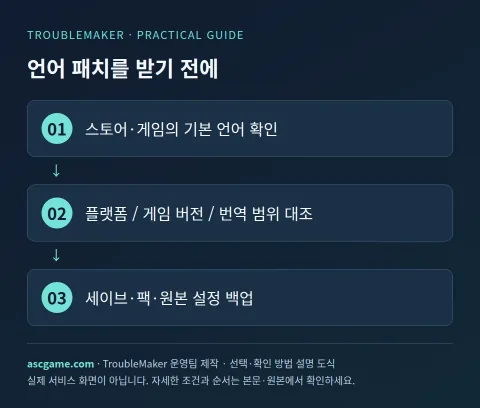
Read the interface, subtitles, and voiceover in the store's supported languages table. Korean subtitle support does not mean Korean dubbing support. Try changing the language settings in the launcher properties and the in-game Language settings first, and check if a restart or additional download is required to apply them. External patches have separate translation scopes, versions, fonts, and prerequisite loaders, which can break when the game updates.
2. Stardew Valley · Thai, Traditional Chinese, Vietnamese
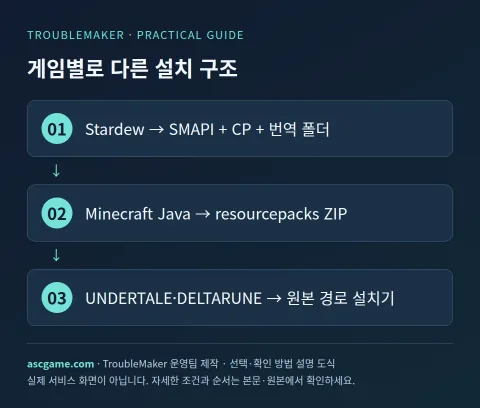
For the Thai pack, we verified the original by Translator Army x ELL. Besides SMAPI and Content Patcher, Thai Font Adjuster is required, so vowel and tone mark positions must also be checked. The Traditional Chinese pack is by DrWoose, Voico, and Seacucu, and the original source requires selecting Traditional Chinese and meeting the requirements for SMAPI, Content Patcher, and Generic Mod Config Menu. The Vietnamese pack uses the provider Kou and Luxanna linked by the discontinued update page. Distinguish between PC and Android files.
- Record your game version and platform, and back up your saves and Mods folders.
- Install SMAPI matching your current game version and prepare Content Patcher and translation-specific Requirements.
- Download the ZIP from the original source and extract it.
- Place the translation folder containing manifest.json directly under Mods.
- Run with SMAPI and select the translation language. Compare menus, new dialogues, item descriptions, and font symbols.
- If it fails, isolate one translation pack at a time to compare, and forward the SMAPI logs and game/mod versions to the original creator.
3. Minecraft Java · ZIP Resource Pack Method
Thy Khmer pack adds ភាសាខ្មែរ(កម្ពុជា) to the language menu. The Moroccan Darija pack is a Moroccan dialect distinct from Standard Arabic, and the creator recommends a separate Arabic font pack. Better Russian improves existing Russian phrases, and _AR in the filename means Arabic numerals. Do not mistake it for an Arabic translation file. The Sodium multilingual pack is a translation of the Sodium settings UI and differs in scope from the full Minecraft translation.
- Verify it is Java Edition and record the launcher instance and game version you are using.
- Choose a ZIP from the original Versions supporting the same game version.
- Open the actual resourcepacks folder via Options → Resource Packs → Open Pack Folder.
- Place the ZIP without extracting it and enable the pack in-game.
- Select the language guided by the original and verify application.
- If it is a translation for Sodium, verify the video settings text with Sodium and a compatible loader installed.
4. UNDERTALE · DELTARUNE · Italian Installer
The shared installer of the Undertale Spaghetti Project patches both games separately. UNDERTALE specifies v1.08 in the original, and DELTARUNE specifies chapters 1-4 and individual test builds, so cross-reference those ranges first. For Windows, the .NET 8.0 Desktop Runtime requirement is noted. Select the legitimate game's actual executable file or macOS .app path, and do not mistakenly designate the downloaded patch folder as the game path.
- Back up saves and the original installation folder, and compare versions in the README under Compatibilità.
- Download the installer for your operating system from the creator's release and extract it outside the game folder.
- Select the game type and specify the actual executable or .app path.
- After installation, verify Italian dialogue and menus using a separate test save.
- To uninstall, restore game files via Steam integrity check or reinstall from the store as guided by the original.
- When patching again, restore to the original state rather than overwriting existing patches, and check the version.
5. Hollow Knight · Read Latest Version Incompatibility Warning First
Hien Ngo's Vietnamese Lang README warns that it does not match the latest Refreshed edition and the modding API, explaining the game version 1.5.11833 requirement. Do not introduce this as a Vietnamese patch for the latest edition. Proceed according to the creator's guide only if you can use the supported version from the store where you own the game, and readers keeping the latest edition should not install it immediately. Also check save and API compatibility.
If in a supported environment, find and install Vietnamese Lang from Lumafly linked by the creator and check LanguageSupport and SFCore dependencies. For manual installation, follow the README for the DLL path and API installation method. Select Tiếng Việt in the game's Options → Game → Language. If issues occur, disable the translation via the mod manager to return to the default language, then compare using store original file verification and backup restoration.
6. When Text Breaks or Remains Partly in English
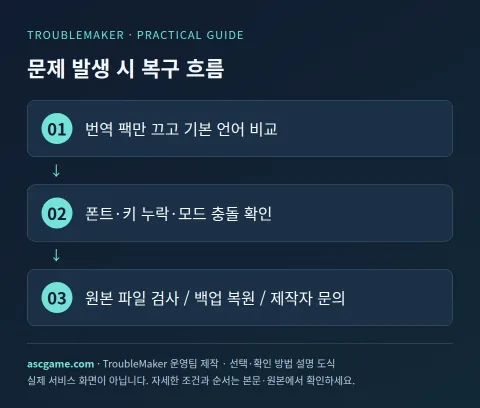
If all text appears as squares, check font requirements first; if Thai tone marks look strange, check the dedicated font adjustment mod. If only new items are in English, new translation keys may not have been added after an update, or they might be text from another mod. For translation conflicts, turn off other packs one by one to compare. Folder nesting and ZIP extraction vary by game, and a single installation method does not apply to all patches.
Inquiry Example: Organize game and platform [info], game version [number], patch version [number], loader and prerequisite mods [list], selected language [notation], error scene [description], and whether it reproduces in the baseline setup [result]. Send only the necessary logs and settings before making your entire game save public.
7. Original Download and Recovery
This resource links to the creator's original downloads and does not re-upload patch or game files. Stardew Thai, Traditional Chinese, and Vietnamese packs also state conditions prohibiting re-uploading. If application fails, recover by turning off resource packs and removing the ZIP, removing only the specific folder for Content Patcher packs, or using file verification and reinstallation for installers that modify original files. In any case, keep a separate copy of your current save before restoring.
Source and Verification Criteria
Prepared by the TroubleMaker operations team, verified on October 7, 2026. Images are custom-made diagrams and do not represent actual game compatibility test results. Check installation conditions against the original sources.
Gemini machine translation · Original text and source region are preserved.
Original language · ko
게임 언어 패치 적용법: 태국어·베트남어·번체·크메르어·이탈리아어 자료 정리
외국어 게임을 바꾸고 싶을 때는 먼저 공식 지원 언어를 확인한 뒤 필요한 외부 패치를 찾으세요. 한국어·영어·일본어 등이 게임 안에 이미 포함돼 있다면 외부 실행 파일을 받지 않아도 됩니다. 이번 자료실 보충에는 Stardew Valley, Minecraft, UNDERTALE, DELTARUNE, Hollow Knight의 실제 배포 페이지와 설치·제거 방법을 추가했습니다. 상세에서 원본과 지원 빌드를 확인하세요.
[1. 공식 언어와 외부 패치 구분]
스토어의 지원 언어 표에서 인터페이스·자막·음성을 각각 읽습니다. 자막 한국어 지원이 곧 한국어 더빙 지원을 뜻하지 않습니다. 런처 속성의 언어 설정, 게임 안의 Language 설정을 먼저 바꿔 보고 적용에 재시작·추가 다운로드가 필요한지도 확인합니다. 외부 패치에는 번역 범위·버전·폰트·선행 로더가 따로 있어 게임을 업데이트하면 깨질 수 있습니다.
[image:conditions]
[2. Stardew Valley · 태국어·번체 중국어·베트남어]
태국어 팩은 Translator Army x ELL의 원본을 확인했습니다. SMAPI·Content Patcher 외에 Thai Font Adjuster가 요구되어 모음·성조 위치도 확인해야 합니다. 번체 중국어는 DrWoose·Voico·Seacucu의 팩이며 원본에서 正體中文 선택과 SMAPI·Content Patcher·Generic Mod Config Menu 요구 사항을 확인할 수 있습니다. 베트남어는 업데이트 중단 페이지가 연결하는 Kou·Luxanna의 제공처를 사용합니다. PC와 Android 파일을 구분하세요.
1. 게임 버전과 플랫폼을 기록하고 세이브·Mods 폴더를 백업합니다.
2. 현재 게임에 맞는 SMAPI를 설치하고 Content Patcher와 번역별 Requirements를 준비합니다.
3. 원본에서 ZIP을 받아 압축을 풉니다.
4. manifest.json이 들어 있는 번역 폴더를 Mods 바로 아래에 놓습니다.
5. SMAPI로 실행하고 번역 언어를 선택합니다. 메뉴·새 대화·아이템 설명·폰트 기호를 비교합니다.
6. 실패하면 번역 팩 하나만 빼서 비교하고 SMAPI 로그와 게임·모드 버전을 원본 지원에 전달합니다.
[3. Minecraft Java · ZIP 리소스팩 방식]
크메르어 팩은 언어 메뉴에 ភាសាខ្មែរ(កម្ពុជា)를 추가합니다. 모로코 다리자 팩은 표준 아랍어와 다른 모로코 방언이며 제작자는 별도 아랍어 글꼴 팩을 권장합니다. Better Russian은 기존 러시아어 문구를 개선하며 파일명의 _AR은 아랍 숫자를 의미합니다. 아랍어 번역 파일로 오해하지 마세요. Sodium 다국어 팩은 Sodium 설정 UI의 번역이며 Minecraft 전체 번역과 범위가 다릅니다.
1. Java Edition인지 확인하고 사용하는 런처 인스턴스와 게임 버전을 기록합니다.
2. 원본 Versions에서 동일 게임 버전을 지원하는 ZIP을 고릅니다.
3. 설정 → 리소스 팩 → 팩 폴더 열기로 실제 resourcepacks 폴더를 엽니다.
4. ZIP을 압축 해제하지 않고 넣고 게임에서 팩을 켭니다.
5. 원본이 안내하는 언어를 선택하고 적용을 확인합니다.
6. Sodium용 번역이면 Sodium과 호환 로더가 설치된 상태에서 비디오 설정 문구까지 확인합니다.
[image:request]
[4. UNDERTALE·DELTARUNE · 이탈리아어 설치기]
Undertale Spaghetti Project의 동일 설치기는 두 게임을 구분해 패치합니다. UNDERTALE은 원본에 v1.08, DELTARUNE은 챕터 1–4와 개별 테스트 빌드가 명시돼 있으므로 그 범위를 먼저 대조합니다. Windows는 .NET 8.0 Desktop Runtime 요구 사항이 안내됩니다. 정품 게임의 실제 실행 파일 또는 macOS .app 경로를 선택하며 다운로드한 패치 폴더를 게임 경로로 잘못 지정하지 마세요.
1. 세이브와 원본 설치 폴더를 백업하고 README의 Compatibilità에서 버전을 대조합니다.
2. 제작자 릴리스의 운영체제용 설치기를 내려받아 게임 폴더 밖에 압축을 풉니다.
3. 게임 종류를 선택하고 실제 실행 파일 또는 .app 경로를 지정합니다.
4. 설치 완료 후 별도 테스트 세이브에서 이탈리아어 대화·메뉴를 확인합니다.
5. 제거는 원본 안내대로 Steam 무결성 검사 또는 구매처 재설치로 게임 파일을 복원합니다.
6. 다시 패치할 때는 기존 패치를 겹쳐 넣기보다 원본 상태로 복구한 뒤 버전을 확인합니다.
[5. Hollow Knight · 최신판 비호환 경고를 먼저 읽기]
Hien Ngo의 Vietnamese Lang README는 Refreshed 최신판과 모딩 API가 맞지 않는다고 경고하고 게임 1.5.11833 조건을 설명합니다. 이를 최신판용 베트남어 패치로 소개하면 안 됩니다. 정품 보유 스토어에서 해당 지원 버전을 사용할 수 있는 경우에만 제작자 안내대로 진행하고, 최신판을 유지할 독자는 바로 설치하지 않습니다. 세이브·API 호환성도 확인하세요.
지원 환경이라면 제작자가 연결한 Lumafly에서 Vietnamese Lang을 찾아 설치하고 LanguageSupport·SFCore 의존성을 확인합니다. 직접 설치 시 DLL 경로와 API 설치법은 README를 따릅니다. 게임의 Options → Game → Language에서 Tiếng Việt를 선택합니다. 문제가 생기면 모드 관리자로 번역을 끄고 기본 언어로 돌아간 뒤 스토어 원본 파일 검사와 백업 복원으로 비교합니다.
[image:contact]
[6. 글자가 깨지거나 일부가 영어로 남을 때]
모든 글자가 네모라면 폰트 요구 사항, 태국어 성조 위치가 이상하면 전용 폰트 조정 모드부터 확인합니다. 새 아이템만 영어면 업데이트 후 새 번역 키가 추가되지 않았거나 다른 모드의 텍스트일 수 있습니다. 번역 충돌은 다른 팩을 하나씩 꺼서 비교하세요. 폴더 중첩과 ZIP 해제 여부는 게임별로 다르며 모든 패치에 한 가지 설치법을 적용하지 않습니다.
문의 예시: 게임·플랫폼 [정보], 게임 버전 [숫자], 패치 버전 [숫자], 로더·선행 모드 [목록], 선택 언어 [표기], 오류 장면 [설명], 기본 구성에서의 재현 여부 [결과]를 정리합니다. 게임 전체 세이브를 공개로 올리기 전에 필요한 로그·설정만 보내세요.
[7. 원본 다운로드와 복구]
이번 자료는 제작자 원본 다운로드로 연결하며 패치·게임 파일을 재업로드하지 않습니다. Stardew 태국어·번체·베트남어 팩은 재업로드 금지 조건도 명시되어 있습니다. 적용 실패 시 리소스팩은 끄고 ZIP 제거, Content Patcher 팩은 해당 폴더만 제거, 원본 파일을 바꾸는 설치기는 파일 검사·재설치라는 방식으로 복구합니다. 어떤 방식이든 현재 세이브를 먼저 별도로 보관한 뒤 복구하세요.
[출처와 확인 기준]
2026년 10월 7일 배포처를 확인해 TroubleMaker 운영팀이 작성했습니다. 이미지는 자체 제작 도식이며 실제 게임 호환성 테스트 결과가 아닙니다. 설치 조건은 원본에서 대조하세요.
Stardew 태국어 원본
Stardew 번체 원본
Stardew 베트남어 원본
Minecraft 크메르어 원본
Minecraft 다리자 원본
Sodium 번역 원본
Better Russian 원본
UNDERTALE·DELTARUNE 이탈리아어 설치기
Hollow Knight 베트남어 원본
comments 0