
How to Make a Factorio Mod: Adding Items, Recipes, and Names in Lua
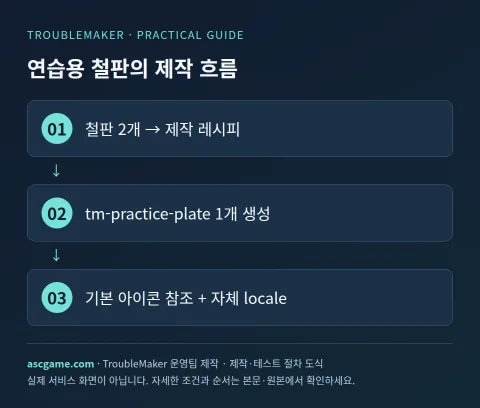
In Factorio 2.0, we will add a practice item called tm-practice-plate made from two iron plates. This is an example of directly creating an item prototype, crafting recipe, and locale, and loading them into the mod folder. This is based on the base mod without relying on Space Age assets, and uses a separate test map instead of an existing factory save.
1. Preparing the Mod Folder and Files
Factorio's executable folder and user data folder may be different. Find the mods folder from the user data location in the official documentation. General Windows installations use %APPDATA%/Factorio/mods, but portable or custom setups vary. Back up your save files and existing mod settings, and create the tm-practice_1.0.0 folder.
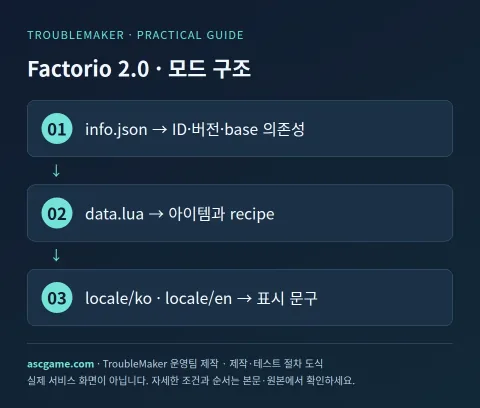
tm-practice_1.0.0/
  info.json
  data.lua
  locale/
    en/strings.cfg
    ko/strings.cfg
2. Declaring Compatibility in info.json
Name is the internal identifier for the mod and matches the beginning of the folder name. Version must match _1.0.0 in the folder. Factorio_version is fixed to 2.0 to avoid confusion with 1.1 structures. Due to the base condition in dependencies, you can use the base game prototypes.
{
  "name": "tm-practice",
  "version": "1.0.0",
  "title": "TroubleMaker Practice Plate",
  "author": "TroubleMaker",
  "factorio_version": "2.0",
  "dependencies": ["base >= 2.0.0"],
  "description": "An original item and recipe tutorial."
}
3. Adding Items and Crafting Recipes to data.lua
Copy the item prototype of the basic iron plate and assign a new name and stack size. Icons reference the internal path of the base game owned by the user, so game images are not duplicated in the ZIP. Write recipe ingredients and results using the explicit type/name/amount format of Factorio 2.0. Set enabled=true so it can be found on the test map without separate technology unlocks.
local plate = table.deepcopy(data.raw.item["iron-plate"])
plate.name = "tm-practice-plate"
plate.order = "a[tm-practice-plate]"
plate.stack_size = 100

data:extend({
  plate,
  {
    type = "recipe",
    name = "tm-practice-plate",
    enabled = true,
    energy_required = 1,
    ingredients = {
      {type = "item", name = "iron-plate", amount = 2}
    },
    results = {
      {type = "item", name = "tm-practice-plate", amount = 1}
    }
  }
})
4. Adding Display Names with Locale
Put the following text in locale/ko/strings.cfg. Match the prototype names precisely in the item-name and recipe-name sections. If Lua strings and locale keys differ, internal IDs or Unknown keys may be displayed.
[item-name]
tm-practice-plate=연습용 철판

[recipe-name]
tm-practice-plate=연습용 철판 제작

[item-description]
tm-practice-plate=모드 제작 학습용 아이템입니다.
In locale/en/strings.cfg, put your own English phrases using the same key structure: Practice plate, Make practice plate, An item for modding practice. Save the file as UTF-8. Saving .cfg in JSON format will not read correctly.
5. Enabling the Mod and Verifying Crafting
- Run the game and enable TroubleMaker Practice Plate in Mods.
- When the game restarts to read the mod, check that there are no error messages.
- Play in a new sandbox or test map and prepare iron plates.
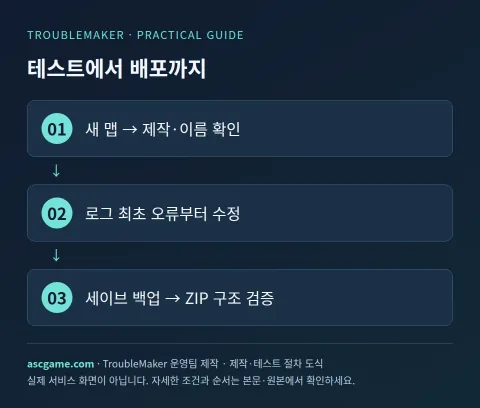
- Find the practice plate recipe in the crafting menu and verify that 2 iron plates turn into 1 item.
- Compare whether names and descriptions appear in their respective locale phrases in Korean and English settings.
- Completely exit the game, disable the mod, and verify the basic setup in a separate test map.
6. Order of Reading Errors
If mod loading stops, look for the first error in factorio-current.log. Check iron-plate spelling and base dependencies for missing prototype errors, and results/ingredients formatting for recipe errors. If the mod is not in the list, check if the info.json path is nested two folders deep. Icons are the same, so having the same appearance as the base iron plate is not a bug. It is easier to test after adding your own custom icons, technology unlocks, and balance once this step succeeds.
7. Removal and Sharing
Removing a mod that adds items may cause those items to disappear from saves. Do not turn it off immediately in important factory saves; verify on a backed-up copy. Create the shared ZIP to contain a single tm-practice_1.0.0 folder and match the name and version. Specify testing conditions with other mods, supported game 2.0, and used base dependencies. After game updates, re-verify loading, crafting, and name display before raising the distribution version.
Original Documentation and Verification Criteria
An introductory guide written by the TroubleMaker operations team, checked against creator and official tool documents on October 7, 2026. Code and diagrams are our own examples for explanation purposes and do not represent actual gameplay verification of the game on this server. Verify and distribute with a separate test save using the versions specified in the text. Compare the latest versions and dependencies of each tool from the originals below.
Gemini machine translation · Original text and source region are preserved.
Original language · ko
팩토리오 모드 만드는 법: Lua로 아이템·레시피·한국어 이름 추가
Factorio 2.0에서 철판 두 개로 만드는 연습용 아이템 tm-practice-plate를 추가합니다. 아이템 prototype, 제작 recipe와 locale을 직접 만들어 모드 폴더로 읽는 예제입니다. Space Age 자산에 의존하지 않는 base 모드 기준이며 기존 공장 세이브 대신 별도 테스트 맵을 사용합니다.
[1. 모드 폴더와 파일 준비]
Factorio는 실행 파일이 있는 폴더와 사용자 데이터 폴더가 다를 수 있습니다. 공식 문서의 사용자 데이터 위치에서 mods 폴더를 찾으세요. 일반 Windows 설치는 %APPDATA%/Factorio/mods를 사용하지만 포터블·커스텀 구성은 달라집니다. 저장 파일과 기존 모드 설정을 백업하고 tm-practice_1.0.0 폴더를 만듭니다.
[image:conditions]
```text
tm-practice_1.0.0/
info.json
data.lua
locale/
en/strings.cfg
ko/strings.cfg
```
[2. info.json에 호환성을 선언하기]
name은 모드 내부 식별자이고 폴더 이름 앞부분과 맞춥니다. version은 폴더의 _1.0.0과 일치해야 합니다. factorio_version은 2.0으로 고정해 1.1용 구조와 혼동하지 않게 합니다. dependencies의 base 조건 때문에 기본 게임 prototype을 사용할 수 있습니다.
```json
{
"name": "tm-practice",
"version": "1.0.0",
"title": "TroubleMaker Practice Plate",
"author": "TroubleMaker",
"factorio_version": "2.0",
"dependencies": ["base >= 2.0.0"],
"description": "An original item and recipe tutorial."
}
```
[3. data.lua에 아이템과 제작법 넣기]
기본 철판의 item prototype을 복사해 새 이름과 스택 크기를 부여합니다. 아이콘은 사용자가 가진 base 게임의 내부 경로를 참조하므로 게임 이미지를 ZIP에 복제하지 않습니다. 레시피의 ingredients와 results는 Factorio 2.0의 명시적 type/name/amount 형식으로 작성합니다. enabled=true로 두어 별도 기술 해금 없이 테스트 맵에서 찾을 수 있게 합니다.
```lua
local plate = table.deepcopy(data.raw.item["iron-plate"])
plate.name = "tm-practice-plate"
plate.order = "a[tm-practice-plate]"
plate.stack_size = 100
data:extend({
plate,
{
type = "recipe",
name = "tm-practice-plate",
enabled = true,
energy_required = 1,
ingredients = {
{type = "item", name = "iron-plate", amount = 2}
},
results = {
{type = "item", name = "tm-practice-plate", amount = 1}
}
}
})
```
[image:request]
[4. locale로 표시 이름을 붙이기]
locale/ko/strings.cfg에 아래 텍스트를 넣습니다. item-name과 recipe-name 섹션에서 prototype 이름을 정확히 맞춥니다. Lua 문자열과 locale 키가 다르면 내부 ID나 Unknown key가 표시될 수 있습니다.
```ini
[item-name]
tm-practice-plate=연습용 철판
[recipe-name]
tm-practice-plate=연습용 철판 제작
[item-description]
tm-practice-plate=모드 제작 학습용 아이템입니다.
```
locale/en/strings.cfg에는 같은 키 구조로 Practice plate, Make practice plate, An item for modding practice라는 자체 영어 문구를 넣습니다. 파일은 UTF-8로 저장합니다. .cfg를 JSON 형태로 저장하면 읽히지 않습니다.
[5. 모드 켜고 제작 확인하기]
1. 게임을 실행하고 Mods에서 TroubleMaker Practice Plate를 활성화합니다.
2. 게임이 모드를 읽기 위해 재시작되면 오류 메시지가 없는지 확인합니다.
3. 새 샌드박스 또는 테스트 맵에서 플레이하고 철판을 준비합니다.
4. 제작 메뉴에서 연습용 철판 레시피를 찾고 철판 2개가 아이템 1개로 바뀌는지 확인합니다.
5. 한국어·영어 설정에서 이름과 설명이 해당 locale 문구로 보이는지 비교합니다.
6. 게임을 완전히 종료하고 모드를 비활성화한 뒤 별도 테스트 맵에서 기본 구성을 확인합니다.
[6. 오류를 읽는 순서]
모드 로딩이 멈추면 factorio-current.log에서 최초 오류를 찾습니다. prototype이 없다는 오류는 iron-plate 철자와 base 의존성, 레시피 오류는 results·ingredients 형식부터 확인합니다. 목록에 모드가 없으면 info.json 경로가 폴더 두 겹 안에 들어갔는지 확인하세요. 아이콘은 동일하므로 기본 철판과 외형이 같아도 버그는 아닙니다. 이 단계가 성공한 뒤 본인 제작 아이콘·기술 해금·밸런스를 추가하는 편이 테스트가 쉽습니다.
[image:contact]
[7. 제거와 공유]
아이템을 추가한 모드는 제거하면 세이브의 해당 아이템이 사라질 수 있습니다. 중요한 공장 세이브에서 바로 끄지 말고 백업한 복사본에서 확인합니다. 공유 ZIP은 tm-practice_1.0.0 폴더 한 개를 포함하도록 만들고 name·version을 맞춥니다. 다른 모드와 함께 테스트한 조건과 지원 게임 2.0, 사용한 base 의존성을 명시하세요. 게임 업데이트 후에는 로딩·제작·이름 표시 세 가지를 다시 확인하고 배포 버전을 올립니다.
[원본 문서와 확인 기준]
2026년 10월 7일 제작자·공식 도구 문서를 확인해 TroubleMaker 운영팀이 작성한 입문 공략입니다. 코드와 도식은 설명을 위한 자체 예제이며 이 서버에서 해당 게임의 실제 플레이를 검증한 결과는 아닙니다. 본문에 명시한 버전으로 별도 테스트 세이브에서 확인하고 배포하세요. 도구별 최신 버전·의존성은 아래 원본에서 대조합니다.
https://wiki.factorio.com/Tutorial:Modding_tutorial/Gangsir
https://wiki.factorio.com/Tutorial:Localisation
https://lua-api.factorio.com/latest/prototypes/RecipePrototype.html
https://wiki.factorio.com/Tutorial:Modding_tutorial
comments 1
Factorio 2.0에서 recipe의 ingredients와 results 형식을 명시적으로 작성할 때, 이전 버전과 달리 반드시 type을 지정해야 하는 구체적인 기술적 이유나 장점이 있을까요?