
Battle.net refund/inquiry method: Check Korean regulations, Battle Coin, and game-specific conditions
This is information for those who want to receive a refund for games or items paid for through Battle.net / Blizzard. First, check the actual seller of the receipt and follow the steps to submit it to the account you purchased it from. We've even outlined how to inquire when you don't see the refund button and how to check the results.
1. Check if my purchase is eligible for a refund
Blizzard's English global refund policy states that it does not apply to Korea and Mainland China. Therefore, the global 14-day/2-hour rule should not be applied to Korean accounts. In Korea, select the purchased game, service, or battle coin item from the Battle.net game refund guide and check the regulations for each. Even if it is a game from the same company, availability and expiration date vary depending on the product type.
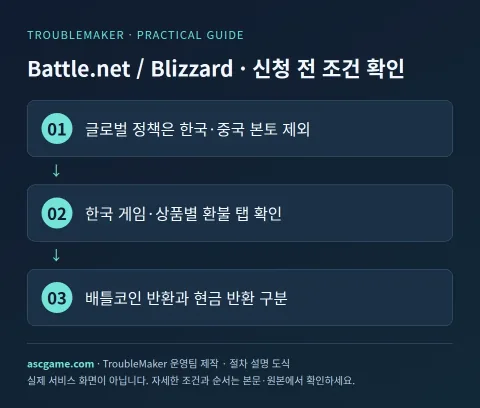
2. Changes by game, DLC, and subscription
According to official information in Korea, you can request a refund for a battle tag change ticket if it is within 7 days of purchase and have not yet been used, and you can also request a refund for WoW tokens if it is within 7 days of purchase and have not been used yet. Some products are considered used even when registered at the auction house, so please check the usage status accurately. Refund fees for unused and already used Battle Coins may vary depending on the number of days elapsed since purchase, so we distinguish between refunds of the entire balance and cancellation of specific orders. For paid games and expansions covered by the overseas global policy, the refund request must be made within 14 days of purchase and play time must be 2 hours or less. These global conditions are not a common refund rule for Korean accounts.
3. Materials to prepare before application
Order number, payment date and time, product name/edition, amount/currency, actual payment destination, account country, execution/use status are organized in one note. If there is an error, write down the error code, when it occurred, and what action you have already tried. Attach only the part of the receipt screen that shows your account email and order to official private inquiries and do not post it in public comments.
4. Proceed with refund application step by step
- Check the country and actual payment location of your Battle.net account. Payments for Apple, Google, Steam, and consoles are requested from the relevant store.
- Record the order number, payment date, amount, and game/service name in your account purchase history. Distinguish between purchasing Battle Coins and ordering using Battle Coins.
- In the Korean Battle.net game refund guide, select the relevant game and product tab to compare the conditions.
- At Blizzard Korea Customer Support, select the relevant game → Payment/Refund Issues and place an order.
- If an automatic refund service is provided, proceed first, and if it is not resolved, send detailed reasons through the inquiry form on the same screen.
- Save the receipt number and answer and check whether the return method is cash, original payment method, or battle coin.
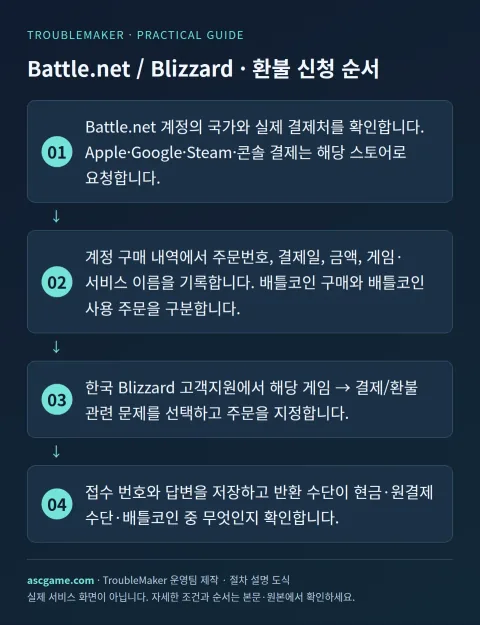
5. When it is not on the list or the money is not visible after approval
The Korean guide separately explains returns of products purchased with Battle Coins and requests to receive those coins back in cash. If you want a cash refund as well, please clearly state it in the application form and check the current balance and fee conditions. Items that require confirmation of the subscriber's name will be submitted through the official, private application route. Different terms and conditions may apply to WoW usage hours, immediate guild services, card packs and opened bundles.
6. Contact customer support
Game bug inquiries and payment refunds have different support menus. Select Payment/Refund on the support page and send us your game, order, and usage history. For international accounts, additionally check the policy documents for the actual account country. Call of Duty's in-game ID and battle tag change rights are different services, so write down the exact name of the service you paid for. If a fee or reason for exclusion is provided in the answer, we will ask for the calculation basis and actual refund amount.
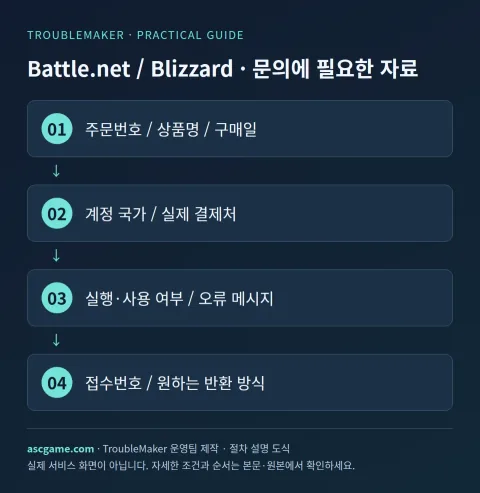
7. Inquiry that can be rewritten as is
The sentence below is an example of an inquiry message sent to customer support and is not a method of bypassing approval. Replace the parentheses with actual information and erase anything that does not apply to your situation. In particular, whether it is used or when it is first run is stated truthfully.
Title: [Battle.net / Blizzard] Purchase Refund / Payment Inquiry
Order number: [Order number on receipt]
Product Name/Edition: [Game / DLC / Subscription Name]
Purchase date/amount/currency: [Date and actual amount]
Purchase place/account country: [store and country]
Run/Use: [Play time / Not used]
Problem: [When it occurred and the actual reason]
Actions already attempted: [Actions and Results]
Request: [Refund availability / Confirm order / Check processing status]
Existing application number: [Enter if available]
8. Check after submission
Save the application completion screen and confirmation email and check the status of your request first. Reviewing, approval, rejection, and waiting for payment company reflection are different states. If denied, check what conditions were applied and supplement the original request as new evidence becomes available. Even if a refund is approved, check separately whether automatic renewal has been canceled. The process is completed by confirming the final return method and changes in game/item usage rights.
Source and verification criteria
Written by the TroubleMaker operations team based on the original instructions confirmed on October 7, 2026. The images below are schematics I created to explain the procedure and are not actual account screens or proof of application completion. Menu names and terms of provision may vary depending on account country, product, or update, so please check the original page as well.
Refund policy for each Battle.net game in Korea
Google Translate machine translation · Original text and source region are preserved.
Original language · ko
배틀넷 환불·문의 방법: 한국 규정, 배틀코인과 게임별 조건 확인
Battle.net / Blizzard에서 결제한 게임이나 아이템을 돌려받고 싶은 분을 위한 안내입니다. 먼저 영수증의 실제 판매처를 확인하고, 구매한 계정으로 접수하는 순서를 따라가세요. 환불 버튼이 안 보일 때 문의하는 방법과 결과를 확인하는 방법까지 정리했습니다.
[1. 내 구매가 환불 대상인지 확인]
Blizzard의 영문 글로벌 환불 정책은 한국과 중국 본토에 적용하지 않는다고 명시합니다. 따라서 한국 계정에 글로벌 14일·2시간 규정을 그대로 적용하면 안 됩니다. 한국은 Battle.net 게임 환불 안내에서 구매한 게임·서비스·배틀코인 항목을 골라 각각의 규정을 확인합니다. 같은 회사의 게임이어도 상품 종류에 따라 사용 여부와 기한이 달라집니다.
[image:conditions]
[2. 게임·DLC·구독별로 달라지는 점]
한국 공식 안내에서 배틀태그 변경권은 구매 후 7일 이내 미사용 조건, WoW 토큰은 7일 이내 미사용 조건 등이 안내됩니다. 경매장 등록도 사용으로 보는 상품이 있으므로 사용 상태를 정확히 확인하세요. 배틀코인은 미사용·사용 여부와 구매 후 경과일 등에 따라 수수료가 달라질 수 있어 잔액 전체 반환과 특정 주문 취소를 구분합니다. 해외 글로벌 대상의 유료 게임·확장팩에는 14일·2시간 이하 기준이 있지만 한국 계정의 공통 기준은 아닙니다.
[3. 신청 전에 준비할 자료]
주문번호, 결제일과 시각, 상품명·에디션, 금액·통화, 실제 결제처, 계정 국가, 실행·사용 여부를 한 메모에 정리합니다. 오류가 있다면 오류 코드와 발생 시점, 이미 시도한 조치를 적습니다. 영수증 화면은 계정 이메일과 주문을 확인할 수 있는 부분만 공식 비공개 문의에 첨부하고 공개 댓글에는 올리지 마세요.
[4. 환불 신청을 단계별로 진행하기]
1. Battle.net 계정의 국가와 실제 결제처를 확인합니다. Apple·Google·Steam·콘솔 결제는 해당 스토어로 요청합니다.
2. 계정 구매 내역에서 주문번호, 결제일, 금액, 게임·서비스 이름을 기록합니다. 배틀코인 구매와 배틀코인 사용 주문을 구분합니다.
3. 한국 Battle.net 게임 환불 안내에서 해당 게임과 상품 탭을 선택해 조건을 대조합니다.
4. 한국 Blizzard 고객지원에서 해당 게임 → 결제/환불 관련 문제를 선택하고 주문을 지정합니다.
5. 자동 환불 서비스가 제공되면 먼저 진행하고, 해결되지 않으면 같은 화면의 문의 접수로 상세 사유를 보냅니다.
6. 접수 번호와 답변을 저장하고 반환 수단이 현금·원결제 수단·배틀코인 중 무엇인지 확인합니다.
[image:request]
[5. 목록에 없거나 승인 뒤 돈이 안 보일 때]
한국 안내는 배틀코인으로 산 상품의 반환과 그 코인을 현금으로 돌려받는 요청을 따로 설명합니다. 현금 반환을 함께 원한다면 접수 내용에 분명히 적고 현재 잔액·수수료 조건을 확인하세요. 가입자 명의 확인이 필요한 항목은 공식 비공개 접수 경로를 이용합니다. WoW 이용 시간, 즉시 적용되는 길드 서비스, 카드 팩과 개봉된 묶음은 서로 다른 조건이 적용될 수 있습니다.
[6. 고객지원으로 문의하기]
게임 버그 문의와 결제 환불은 지원 메뉴가 다릅니다. 지원 페이지에서 결제/환불을 선택하고 게임·주문·사용 이력을 전달하세요. 해외 계정이라면 실제 계정 국가의 정책 문서를 추가로 확인합니다. 콜 오브 듀티의 인게임 ID와 배틀태그 변경권은 다른 서비스이므로 결제한 서비스 명칭을 정확히 적습니다. 답변에서 수수료나 제외 사유가 제시되면 계산 기준과 실제 반환액을 질문합니다.
[image:contact]
[7. 그대로 고쳐 쓸 수 있는 문의문]
아래 문장은 접수 문안 예시이며 승인 우회 방법이 아닙니다. 괄호를 실제 정보로 바꾸고 본인 상황에 없는 내용을 지우세요. 특히 사용 여부나 첫 실행 시각은 사실대로 적습니다.
```text
제목: [Battle.net / Blizzard] 구매 환불 / 결제 문의
주문번호: [영수증의 주문번호]
상품명·에디션: [게임 / DLC / 구독 이름]
구매일·금액·통화: [날짜와 실제 금액]
구매처·계정 국가: [스토어와 국가]
실행·사용 여부: [플레이 시간 / 미사용 여부]
문제: [발생 시점과 실제 사유]
이미 시도한 조치: [조치와 결과]
요청: [환불 가능 여부 / 주문 확인 / 처리 상태 확인]
기존 접수번호: [있으면 기재]
```
[8. 접수 후 확인할 것]
신청 완료 화면과 확인 메일을 보관한 뒤 요청 상태를 먼저 확인합니다. 심사 중, 승인, 거절, 결제사 반영 대기는 서로 다른 상태입니다. 거절됐다면 어떤 조건이 적용됐는지 확인하고 새로운 증거가 있을 때 기존 요청에 보충합니다. 환불 승인이 나더라도 자동 갱신 해지가 함께 됐는지 따로 확인하세요. 최종 반환 방식과 게임·아이템 사용 권한의 변화를 확인하면 절차가 마무리됩니다.
[출처와 확인 기준]
2026년 10월 7일에 확인한 원본 안내를 바탕으로 TroubleMaker 운영팀이 작성했습니다. 아래 이미지들은 순서를 설명하기 위해 직접 만든 도식이며 실제 계정 화면이나 신청 완료 증빙은 아닙니다. 메뉴 명칭과 제공 조건은 계정 국가·제품·업데이트에 따라 달라질 수 있으므로 원본 페이지도 함께 확인하세요.
https://kr.battle.net/support/ko/article/75828
https://kr.support.blizzard.com/ko/
https://www.blizzard.com/en-us/legal/88faa0eb-4ffa-455f-914c-6b1f4bc69fa9/blizzard-refund-policy
comments 1
한국 계정의 경우 글로벌 정책과 달리 배틀코인으로 구매한 상품을 환불할 때 현금 반환과 배틀코인 잔액 복구 중 어느 쪽이 우선 적용되는지 선택할 수 있는 기준이 따로 있나요?